Extreme Car Parking 3D review
A 3D parking game on raised obstacle courses: narrow platforms, ramps and barriers between you and a marked bay, and a fall means starting again.
Extreme Car Parking 3D
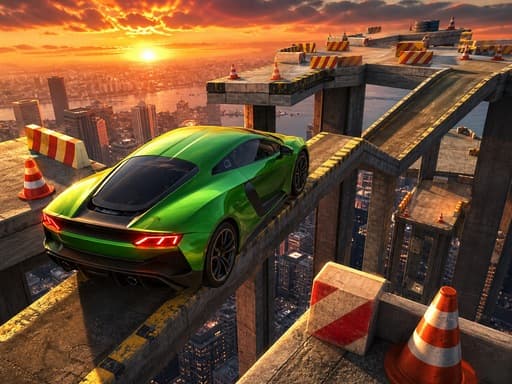
Loads the game in this frame. Nothing is installed; the game runs in your browser tab.
The game is made by its developer and served through its distributor, GameMonetize. It may show its own adverts inside the frame. Read our editorial policy for how we choose what to list.
Controls
Keyboard & mouse
- WASD or the arrow keys for throttle, reverse and steering
- Space for the brake
- Come to a complete stop inside the marked bay
Phone & tablet
- Not documented by the developer
- Expect on-screen steering, gas and brake buttons if supported
- Try one course before planning a longer session
What it is
Extreme Car Parking 3D is a parking game in the loosest sense. The courses are raised above the ground and made of narrow platforms, steep ramps and barriers, and the task is to drive from the start to a marked parking bay and come to a complete stop inside it. Leave the edge and the attempt is over. The parking part is the last few metres; the rest is a slow-speed obstacle course with a car.
The developer's description is two sentences, and the control notes add little. There is no stated course count, no car list and no mention of a timer or star system, so I am reviewing the format rather than a feature list. That format is common in browser 3D games, and how good any one of them is depends almost entirely on how the car handles at low speed and how fairly the courses are built.
How it plays
WASD or the arrow keys drive and steer, and Space is the brake. That is the whole scheme. In a 3D WebGL game of this type, forward is usually a steady push rather than a throttle you can feather, so speed control comes from tapping the key and letting the car coast. Steering on a narrow platform is about small, early corrections; a correction made late on a beam two cars wide is a fall.
Mobile controls are not documented. If the game shows on-screen buttons on a phone, expect them to mirror the keyboard: left, right, forward, reverse and a brake. Held touch buttons make the tap-and-coast rhythm harder than it is on a keyboard, and the 800 by 600 landscape canvas is small on a phone for judging where a platform edge is.
Tips that actually help
Elevated parking courses are about managing momentum, and every habit that helps here is about doing less.
- Tap forward and coast. Holding the accelerator builds speed you then have to remove on a ramp with no run-off.
- Brake before a ramp crest, not after it. A car that goes over a crest with speed leaves the ground and lands wherever its trajectory takes it, usually off the side.
- Take corners on beams by turning early and shallow. Steering angle is the enemy of a narrow platform; a gentle arc that starts a car length early beats a sharp turn at the corner.
- When the car is sliding towards an edge, straighten the wheel and brake. Steering away while moving sideways usually makes the slide worse.
- Line up the bay from a distance and finish in a straight line. Reversing into a bay on a raised platform is slower but more controllable than swinging in nose-first.
- Come to a full stop and wait. The game wants the car stationary inside the marks, and rolling half a wheel out of the box after you thought you had finished is the most common failure.
Raised courses
Putting a parking game on platforms in the sky changes what it tests. A ground-level parking game is about not touching things; this one is about not leaving the road at all, which turns every ramp into a small physics problem. Weight transfer matters more than it looks: a car going up a steep ramp shifts load to the rear and steers vaguely at the top, and a car coming down loads the front and can tip forward under braking. The obstacles the developer lists, narrow platforms, steep ramps and barriers, are all visible from a distance; the challenge is execution, not discovery.
Where it falls short
There is very little here beyond the format. The description is thin to the point of saying almost nothing, mobile support is not addressed, and there is no stated progression to keep you going once you have parked a few times. Falls send you back to the start, which is fair in principle but tedious when the fall happened two metres from the bay. It does what the title says and not much more.
What works
- Simple controls that anyone can pick up
- Tests slow-speed precision rather than reflexes
- Short courses suit a quick break
What holds it back
- Almost no stated features or progression
- Mobile controls undocumented
- A fall restarts the whole course
Verdict
2.5Extreme Car Parking 3D is a functional obstacle-course driving game with a parking bay at the end. If you find low-speed precision relaxing and have a keyboard, a few courses will pass ten minutes pleasantly. Anyone wanting cars to unlock, a career or a sense of progress should skip it; there is no evidence of any of those here.
Questions people ask
- How does parking work in Extreme Car Parking 3D?
- Drive the course, then bring the car to a complete stop inside the marked bay. Being partly outside the lines or still moving does not count.
- What happens if I fall off?
- Falling from the track ends the attempt. The developer does not mention checkpoints, so assume a fall means starting the course again.
- Can I play it on a phone?
- The developer documents only keyboard controls. Many 3D browser games of this type show touch buttons on a phone, but I cannot confirm that here, so try it before relying on it.
- Is progress saved?
- Nothing is stated. If completed courses are remembered, it will be in the browser's local storage on that device, so do not expect them to follow you elsewhere.
If you liked this, try
 Racing
Bus Driving Master 3D
2.5A 3D bus simulator of passenger runs across city, highway and mountain routes, driven with WASD alone. Routes get harder; features are thinly described.
Read the review → Racing
Neon City Drift Racing
3.0A 3D night-time drift game on lit city streets: pick a car, slide through corners for score and chase your best. Simple to start, thin on features.
Read the review → Racing
Mega Ramp Car Stunt Racing
3.0A 3D stunt driving game of huge ramps, basketball hoops and moving targets in muscle and super cars, with nitro. Loosely structured and keyboard only.
Read the review → Sports
Neon Mini Golf
4.0A 39-hole browser mini golf with synthwave looks, drag-and-release putting, and bumpers, walls and teleporters in the way. Stars unlock the later holes.
Read the review →