Mini Pool 3D review
A three-mode 3D pool table for the browser: free play, 20 Arcade layouts and a clock-based mode. Solo potting practice with no opponent to beat.
Mini Pool 3D
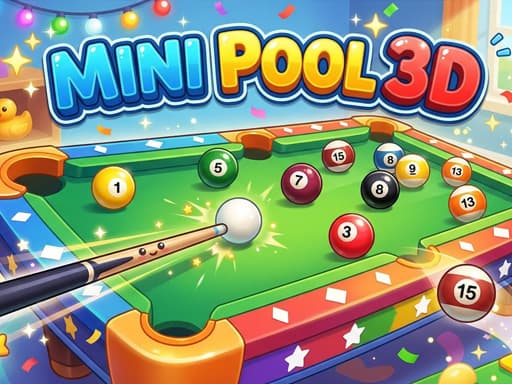
Loads the game in this frame. Nothing is installed; the game runs in your browser tab.
The game is made by its developer and served through its distributor, GameMonetize. It may show its own adverts inside the frame. Read our editorial policy for how we choose what to list.
Controls
Keyboard & mouse
- Mouse only: click and drag to aim
- Release to take the shot
- Menus and mode select by click
Phone & tablet
- Touch and drag to aim
- Lift your finger to shoot
- Same single-finger scheme for menus
What it is
Browser pool usually fails in one of two ways: it simulates the table faithfully and makes aiming a chore, or it simplifies aiming until the balls behave like marbles. Mini Pool 3D sits in the middle. It is a table viewed in three dimensions, the stated goal is to get every ball off it, and there are three ways to do that: Classic free play, an Arcade set of 20 levels, and Time Attack, where the clock is the opponent.
What it is not, as far as the developer's description goes, is a match game. Nothing in the notes mentions a computer opponent, taking turns, or the rules of eight-ball such as calling pockets or the black going last, even though the catalogue tags mention 8-ball. Treat it as a potting exercise: you, a cue, and a table that needs emptying.
How it plays
The only input listed is a click or a tap, which in browser pool means the pointer does everything: you set a line from the cue ball, choose how hard to hit, and let go. That is a sensible fit for a mouse, where fine adjustments to the angle are easy, and it survives on a touchscreen as long as the game gives you room to drag without your finger hiding the object ball. The 3D view is the part I would watch. Perspective can make a straight-looking shot a degree or two off, and in pool a degree is the difference between the pocket and the jaw.
Tips that actually help
Pool tips transfer between tables better than any other sport's, because the geometry is the same everywhere. These are the ones I would carry into this game.
- Aim with the ghost ball. Picture a ball sitting where the cue ball needs to be at the moment of contact, in line with the object ball and the pocket, and send the cue ball to that spot rather than at the object ball itself.
- On a firm, plain hit the cue ball leaves the object ball at roughly a right angle to the object ball's path. Use that tangent line to guess where the cue ball ends up, and stop sending it towards a pocket.
- Cushions reflect at close to the angle they receive, but a hard shot comes off shorter than a soft one. When banking, hit gently and trust the mirror line.
- Pot the ball that leaves the easiest next shot, not the one that looks most satisfying. Clearing a table is about the third shot, not the first.
- If the game exposes spin (top, bottom or side), practise a plain stop shot first. Spin without a reliable centre hit only adds variables.
The modes
Classic free play is the mode I would point new players at, because the table does not judge you and every miss is information about how the cushions rebound and how much speed the cloth takes off a ball. Arcade is where the game earns a return visit: 20 levels is a modest number, but a finite sequence gives a reason to come back, and I would expect later layouts to demand more cushion work and awkward cue-ball positions. Time Attack turns the same skill into a rhythm problem: quick, safe pots beat ambitious ones, because the seconds spent lining up a long cut are seconds you do not have. None of the three involves an opponent, and there is no two-player option in the description, so if you hand the mouse to a friend it will be for turns at the same solo target rather than a match.
Where it falls short
The missing opponent is the obvious gap. Pool is a social game, and the pleasure of a safety shot, or of watching someone else's plan collapse, is absent here. The Arcade mode is modest at 20 levels, and the description gives no detail on how progress is stored, so assume it lives in this browser. Perspective in a 3D pool game also asks more of your eyes than a flat top-down table, and on a phone the small screen compounds that.
What works
- Three distinct ways to use one table
- Aim-and-release control suits a mouse
- Time Attack fits a genuine short break
- Free play is forgiving for learners
What holds it back
- No computer opponent or two-player match
- Only 20 Arcade levels
- 3D perspective makes fine aiming harder than top-down
Verdict
3.5Mini Pool 3D is a competent solo potting game with enough structure in its Arcade and Time Attack modes to justify a few return visits. If you want pool as a contest, against a computer or a friend across the table, this is not it and you should skip it. If you want ten quiet minutes of geometry with a cue, it does that job cleanly.
Questions people ask
- Can I play against a friend or the computer?
- Not according to the developer's description, which lists free play, 20 Arcade levels and Time Attack only. All three are solo modes where the table, not an opponent, is the challenge.
- Does it work on a phone?
- Yes. The single tap-and-drag input translates directly to touch. Aiming long shots is fiddlier on a small screen because your finger covers part of the table, so a tablet or desktop is more comfortable.
- Does it save my Arcade progress?
- The developer does not say. Games like this usually keep progress in the browser's storage, so expect it to persist on the same device and browser but not to follow you elsewhere. See how browser games save progress.
- Does it follow eight-ball rules?
- The description does not mention calling pockets, ball groups or the black going last. As described, the goal in every mode is simply to pocket everything on the table.
If you liked this, try
 Sports
Neon Mini Golf
4.0A 39-hole browser mini golf with synthwave looks, drag-and-release putting, and bumpers, walls and teleporters in the way. Stars unlock the later holes.
Read the review → Sports
Disc Golf Game Master
3.0A casual disc golf course game: read the obstacles, set your power and line, and reach each target with the fewest throws. Single player, no opponent.
Read the review → Sports
Toy Soccer Cup
3.5Turn-based tabletop football where you flick miniature players to pass and shoot. Quick Match, Tournament, same-device two-player and an online mode.
Read the review → Arcade
Neon Ball Slope
3.5An endless neon 3D slope game: steer a glowing ball down a track that gets steeper and faster, with coins, XP, gear, missions and daily leaderboards on top.
Read the review →Guides that mention this game
- explainer
Keyboard or touch? How browser game controls really behave.
Why arrow keys and WASD coexist, what key repeat and ghosting do to your inputs, the five kinds of touch control, and how to read a review's controls box.
- how-to
Playing browser games on a Chromebook: what runs well and what to skip.
Chromebooks run the same Chrome as a desktop, so HTML5 games just work. Where 3D WebGL games stutter and why, plus which reviewed games suit the hardware.