Terrifying Zombies: Tower Defense II review
A 2D zombie defence that mixes towers with your own shooting: personal kills earn the most XP, damage scales with days survived, and a boss is on a countdown.
Terrifying Zombies: Tower Defense II
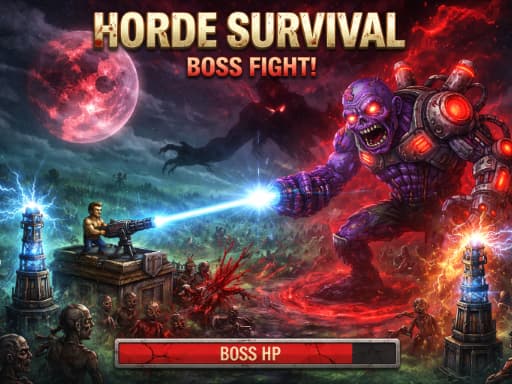
Loads the game in this frame. Nothing is installed; the game runs in your browser tab.
The game is made by its developer and served through its distributor, GameMonetize. It may show its own adverts inside the frame. Read our editorial policy for how we choose what to list.
Controls
Keyboard & mouse
- WASD or arrow keys to move your hero
- Left click to shoot, and to select and place towers
- P to pause and open the save menu
Phone & tablet
- No touch controls are listed; it is built for keyboard and mouse
- Play it on a desktop or laptop
What it is
Most tower defence games make you a spectator: you place, you upgrade, you watch. Terrifying Zombies: Tower Defense II puts a hero on the field as well. You move with WASD or the arrows, shoot with the mouse and place towers with the same click, and the design pushes you towards doing your own killing: zombies you shoot yourself give the most experience, kills by your defences give less. That one rule reshapes the genre. Towers become insurance and area control; the XP that levels you comes from personal risk.
The other stated systems make it a survival game rather than a wave shooter. Days pass, zombie damage scales with the days you have survived, fences upgrade their own maximum health and regeneration every round, a boss countdown shows how many days remain before the big fight, and a dead hero can be cloned and revived for gold. The change notes add two day-and-night maps, new music and a difficulty rebalance.
How it plays
This is a keyboard-and-mouse game with no touch controls listed, so the phone question answers itself. The loop is movement with the left hand and aiming with the right, and towers are placed by clicking, so every placement is a moment when you are not shooting. That tension is deliberate and it is the best thing about the design.
The 1920 by 1080 canvas is the largest in this category and it matters for two reasons. A 2D game at that size with many zombies on screen leans on your machine harder than a small runner does, so close other tabs on a stuttering laptop. And on a small display the browser scales the whole scene down, which shrinks the zombies you are trying to click. Pause with P also opens the save menu; a session here is long enough that saving is a requirement rather than a courtesy.
Tips that actually help
The XP rule and the day-scaling rule together tell you how to play this, and playing it like an ordinary tower defence will get your hero killed early.
- Shoot everything you safely can in the first days. Your defences give less XP, so early on they should catch what gets past you, not do the work.
- Let fences take their free upgrades. Their health and regeneration rise every round on their own, so gold spent shoring them up early is gold wasted.
- Because zombie damage scales with days survived, raw health is a losing race. Spend on killing faster, not on surviving longer.
- Keep enough gold in reserve for a hero clone once the boss countdown gets short. Dying with an empty purse in the final days undoes everything.
- Use the boss countdown to schedule your spending: economy first, then towers, then hold cash for the fight.
- Save from the pause menu at the start of a day, when you know what you have. A bad day is easier to replay than to survive.
Days, scaling and the boss clock
Scaling enemy damage by survived days is a clean way to force an ending. Turtling has a shelf life: whatever fortress you build, the zombies will eventually hit hard enough to walk through it, so the game is a race between your kill rate and their damage curve, with the boss fight as the checkpoint. Clone-and-revive softens a hero death at a gold price, the right compromise for a game this long. Two things are not stated and I would want them clear: whether a save survives closing the browser, and how much harder the night map is than the day one.
Where it falls short
No touch scheme makes this desktop-only, which is fair for a WASD shooter but worth saying plainly. The tags list blood, so parents should check it before handing it over. The description is a change log rather than an explanation, so newcomers get no guidance on what the towers are or how the economy works, and a first session means learning by dying. And the full-HD canvas is demanding; older machines will feel it.
What works
- Shoot-it-yourself XP rule makes you an active player
- Day scaling and a boss clock give every run a shape
- A pause menu with saving, which long sessions need
- Clone-and-revive keeps one mistake from ending the run
What holds it back
- Keyboard and mouse only
- Explains nothing up front
- Heavy on modest hardware
Verdict
3.5If you like tower defence but wish you could get involved, this is a good answer: the XP rule and day scaling force you to fight rather than fortify, and the save menu respects half-hour sessions. It is a desktop game with a real learning cliff. Phone players, and anyone who wants a gentle defence to watch over a coffee, should look elsewhere.
Questions people ask
- Can I play it on a phone or tablet?
- The developer lists only keyboard and mouse controls: WASD or arrows to move, click to shoot and place towers. Treat it as a desktop game.
- Does it save my progress?
- There is a save menu behind the P pause key. The developer does not say whether saves survive closing the browser, so save often and test it early in your first session.
- Why do my towers give less XP than shooting?
- It is a deliberate rule: kills you make yourself earn the most experience, kills by your defences earn less. The game wants you on the field, with towers as backup.
- What happens when my hero dies?
- You can spend gold to clone and revive them and carry on, according to the developer. Keeping a reserve of gold for that is part of the strategy.
If you liked this, try
 Arcade
Stickboy War
3.5A 2D stickman siege game: dig for gold, field a mix of diggers, shield-bearers, archers and bombers, and break the enemy gate across ten-plus campaign levels.
Read the review → Sports
Archery Master Bow and Arrow
2.5Draw, hold and release at a target with a fixed number of arrows and one high score to beat. Arrows drop in flight, so every shot is angle against power.
Read the review →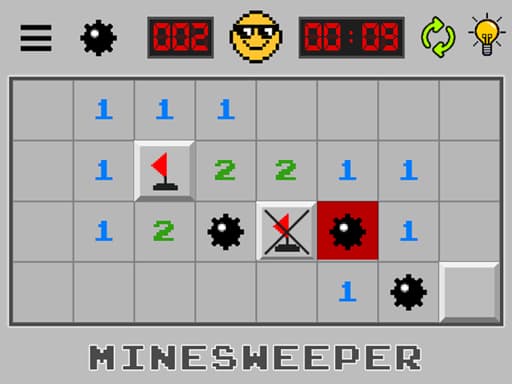 Puzzle
Minesweeper: Find Bombs
3.5A Godot-built minesweeper that swaps the classic board-size picker for a run of levels. Left-click opens a cell, a long press flags it. Best played at a desk.
Read the review → Racing
Monsters Wheels 2
4.0A side-view monster truck game with 24 events across four settings, three trucks to upgrade and a mix of races, car-crushing and backflip challenges.
Read the review →Guides that mention this game
- how-to
Playing browser games on a Chromebook: what runs well and what to skip.
Chromebooks run the same Chrome as a desktop, so HTML5 games just work. Where 3D WebGL games stutter and why, plus which reviewed games suit the hardware.
- list
Nine browser games that fit a ten-minute break.
Nine reviewed games chosen for round length, quick starts and how easily you can stop: minesweeper, 2048, solitaire, ping pong, mini golf and more.
- parents
A parent's guide to browser games: what to check before you say yes.
How browser games are funded, what they store, how to read a review for age fit, which games connect to strangers, and what this site refuses to list.